The short version
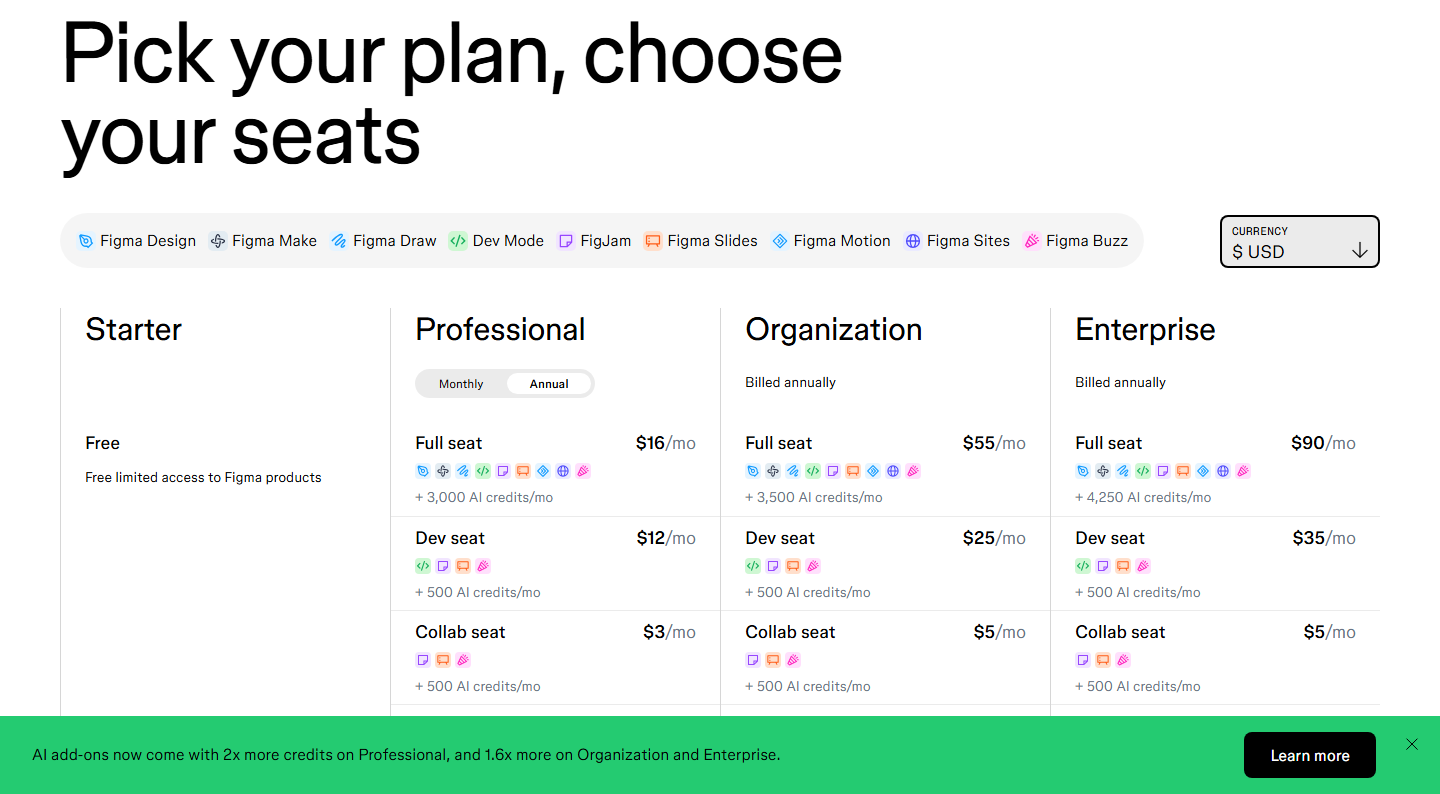
If your Figma pricing notes still say “$12 per editor per month,” they are describing the page as it existed before March 2025. The current pricing page — checked 2026-09-14 against figma.com/pricing in a real browser session, with both the currency and billing controls exercised — sells three seat types (Full, Dev, Collab) across four plans:
| Plan (USD) | Full seat | Dev seat | Collab seat | Billing |
|---|---|---|---|---|
| Starter | Free | Free | Free | — |
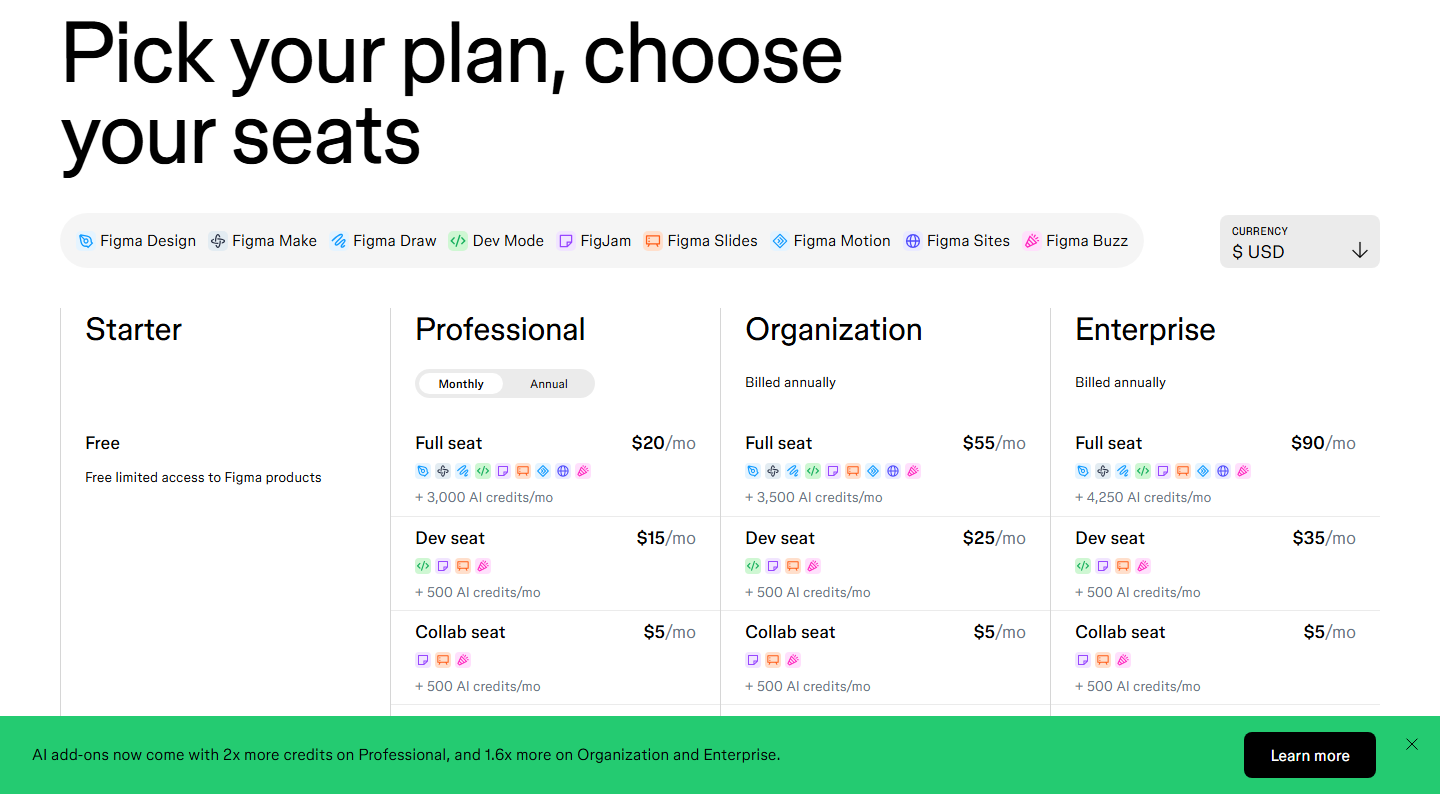
| Professional | $16/mo yearly / $20 monthly | $12 / $15 | $3 / $5 | monthly or annual |
| Organization | $55/mo | $25/mo | $5/mo | annual only |
| Enterprise | $90/mo | $35/mo | $5/mo | annual only |
Every number above was captured from the live page, not from a third-party tracker. Two things make verification genuinely fiddly, and both are worth knowing before you trust any “Figma pricing 2026” article:
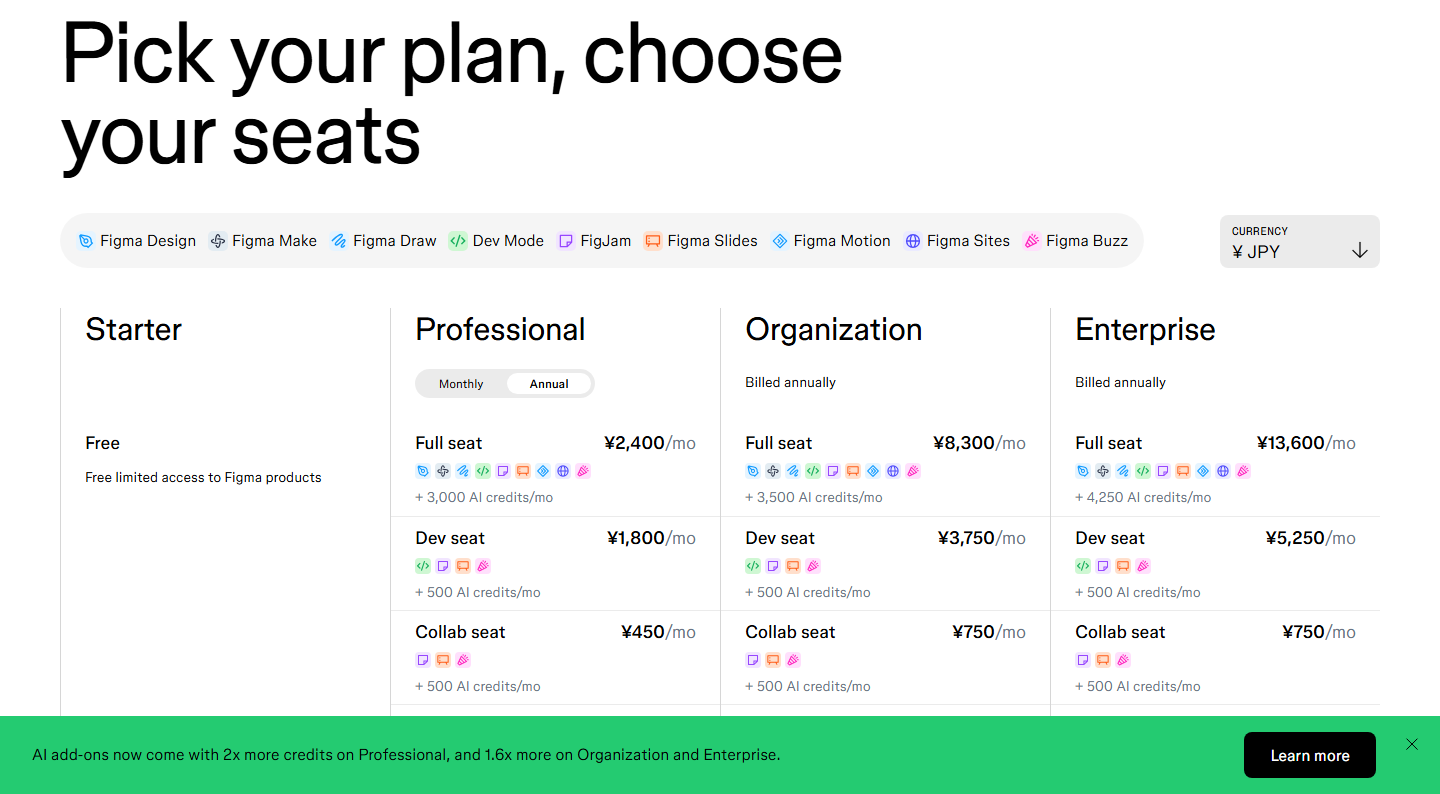
- The page prices itself by visitor region. Our capture session was served JPY by default (Professional Full rendered ¥2,400/mo, with a “CURRENCY: ¥ JPY” control at the top). USD figures appear only after manually opening that control and selecting “$ USD.” A scraper that loads the page once and reads prices can quite honestly report a completely different currency depending on where its machine sits.
- There is no single “monthly premium.” Paying Professional month-to-month costs 25% more on Full ($16 → $20) and Dev ($12 → $15) seats, but 66.7% more on a Collab seat ($3 → $5). Organization and Enterprise print “Billed annually” on the card itself — monthly billing is not offered at those tiers at any price.
This is a terms check, not a hands-on review. We did not create an account, did not build a design file, and we publish no star rating.
What the three seats actually contain
Definitions quoted from the page’s own “What is a seat?” FAQ (captured 2026-09-14):
- Full seat — full access to everything: Figma Design, Figma Make, Figma Draw, Figma Sites, Dev Mode, FigJam, Figma Slides and Figma Buzz. The new betas — Figma Motion (beta) and Figma Sites (beta) are available on Full seats only.
- Dev seat — full Dev Mode, FigJam, Figma Slides and Figma Buzz, plus view/comment access in Design files.
- Collab seat — full FigJam, Figma Slides and Figma Buzz (Figma Buzz beta is available on all seats), view/comment access in Design files, and only basic inspection in Dev Mode.
On every paid plan, people who only view, comment, inspect or export files need no paid seat at all — and notably, the FAQ confirms a free viewer can still inspect measurements, copy CSS/iOS/Android code and export assets. “Full Dev Mode” is the paywall, not inspection itself.
The free Starter plan: what the page actually lists now
The 2026 Starter card is short: free, “unlimited drafts,” UI kits and templates, and 150 AI credits/day, capped at 500 AI credits/month. The familiar old free-tier numbers — “3 projects, 2 editors” — do not appear on the current page. Anyone repeating those limits is reading a 2024-era page; we can confirm only what the current card prints, so we don’t restate the old caps as fact.
AI credits are now a line item on every seat
Credits are pooled per team and consumed by all Figma AI features, with the included monthly allotment varying by seat type and plan, as printed on the cards:
- Starter: 150/day, up to 500/month
- Professional / Organization / Enterprise Full seats: 3,000 / 3,500 / 4,250 per month
- Every other paid seat (Dev, Collab): 500 per month regardless of plan
Additional credits are sold separately as a team-wide add-on (“pay-as-you-go … and/or subscribe to save”), and the page reserves the right to change included allotments. The beta Figma agent is explicitly free during beta and consumes no credits.
The bill nobody warns you about: adding seats mid-year
The pricing FAQ contains the most consequential fine print on the page. On an annual Professional plan, seats added after the contract starts are billed as a separate monthly subscription at the monthly price — $20 for a Full seat, not the $16 annual rate you signed at — prorated for the first partial month, and they keep generating monthly invoices until you deliberately fold them into the annual subscription or remove them. Organization and Enterprise handle it differently: admin approval is required for any paid seat, additions are prorated against the annual term, and invoices for them arrive quarterly.
Practical reading: the headline annual rate applies to seats that exist on renewal day. A growing team on an annual contract is quietly paying the monthly premium for every mid-year hire, which is also why seat-type discipline (Collab for stakeholders, Dev for engineers who need full Dev Mode, Full for designers) is now the main lever on a Figma bill.
Why older articles say $12, $45 and $75
Cross-checked against public pricing-history trackers (saaspricepulse.com, citing Figma’s December 11, 2024 announcement of its first price increase in nearly seven years, effective March 11, 2025): the old per-editor ladder was Professional $12 annual / $15 monthly, Organization $45, Enterprise $75. The 2025 restructure moved to the three-seat model and repriced Full seats to $16 / $55 / $90 — roughly +33%, +22% and +20% respectively. Vendr’s marketplace page (retrieved 2026-09-14) still prints “$12 / $45 list pricing per editor/month” as its comparison baseline, which neatly demonstrates how stale procurement data is on this particular product. Historical figures above come from secondary sources; every current figure comes from our own capture.
Geo currency: our capture detail
Our Playwright session (2026-09-14 UTC) rendered the page in JPY on first load in both default and US-locale/New-York-timezone contexts — locale settings did not override it; the currency follows the network egress region. Annual JPY state printed Professional Full ¥2,400, Dev ¥1,800, Collab ¥450; the monthly toggle produced ¥3,000 / ¥2,250 / ¥750. We then used the page’s own CURRENCY combobox to select “$ USD” and re-captured both billing states; the USD numbers in the table above come from that switched state, with the toggle’s aria-label verified flipping between “Annual selected” and “Monthly selected.” We report no JPY→USD conversion of our own: the yen and dollar figures are each quoted directly from the page in their own currency state.
Verdict (terms-level, no score)
No star rating because we never opened a design file in a paid workspace. At the terms level, the 2026 model is genuinely friendlier to mixed teams — $3–5 Collab seats and free inspect-capable viewers mean not every stakeholder needs a designer-priced license — but it is also easier to mis-budget: three seat prices instead of one, a 25–67% monthly premium depending on seat type, no monthly billing above Professional, geo-defaulted currency that hands casual visitors yen prices, and mid-year additions on annual contracts silently rated at the monthly price. Verify the live page in your own currency before committing a budget; the page changes, and most “Figma pricing” search results are still teaching either the pre-2025 editor ladder or prices scraped in whatever currency the scraper happened to get.
Methodology & sources
- figma.com/pricing — captured 2026-09-14 (UTC) in a real Chromium session: full-page rendered text and screenshots in the geo-default JPY state, then after using the page’s CURRENCY control to select USD, in both Annual and Monthly billing states (toggle state verified via the control’s aria-label; raw text dumps kept in eval-ops/runs/2026-09-14-figma-pricing/). Primary source for every current number and seat definition in this article.
- saaspricepulse.com “Figma Pricing History” — December 11, 2024 announcement / March 11, 2025 effective date and the $12→$16, $45→$55, $75→$90 changes (historical context only).
- vendr.com Figma marketplace page — checked 2026-09-14 as evidence that procurement trackers still quote the old $12/$45 editor rates (stale-data point, not a price source).
- userjot.com and usecarly.com 2025–2026 pricing explainers — cross-checked the seat-type descriptions and the annual-only restriction on Organization/Enterprise against our capture.
- Checked 2026-09-14. Pricing pages change; re-verify before citing.
Related pages
The Figma cluster, in case you are comparing rather than buying figma vs penpot — Figma against Penpot, feature by feature; penpot review — Penpot’s free tier for up to eight people; figma alternatives — the wider set of design-tool alternatives.