The short version
Hands-on test there; plan math here. The free-plan run — booking to cancel, with dated screenshots — is documented in our Calendly hands-on review; this page reads calendly.com/pricing only.
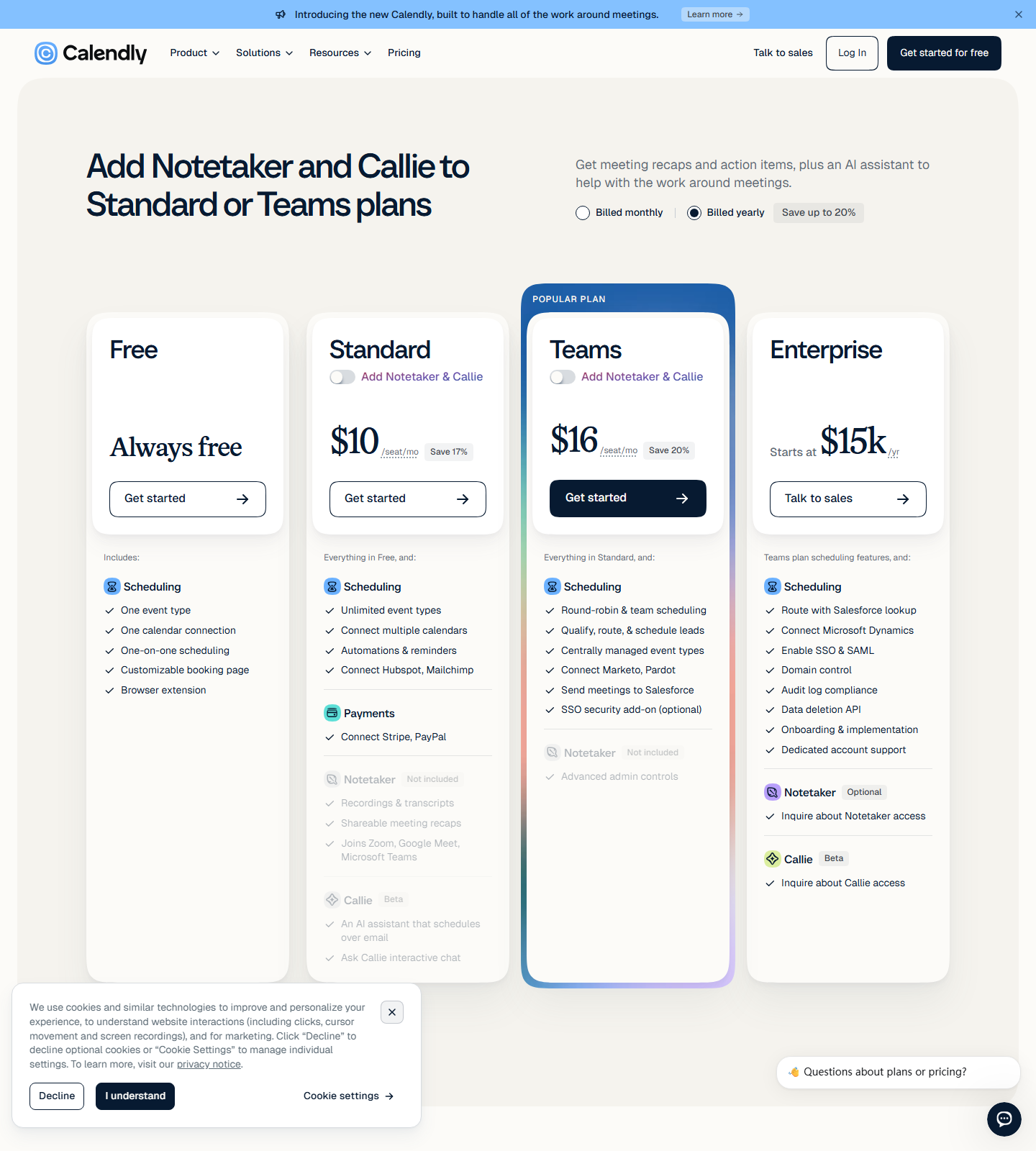
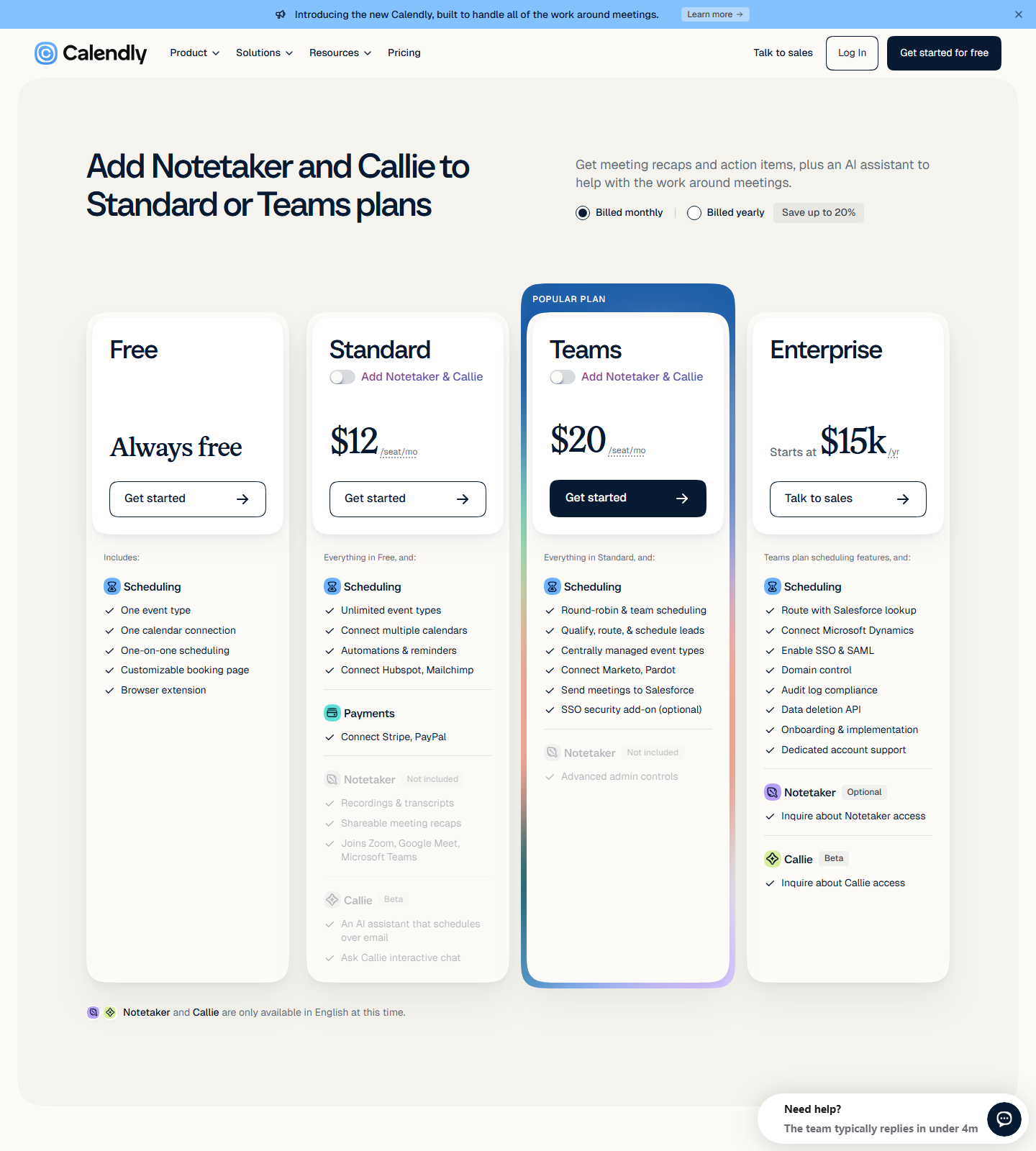
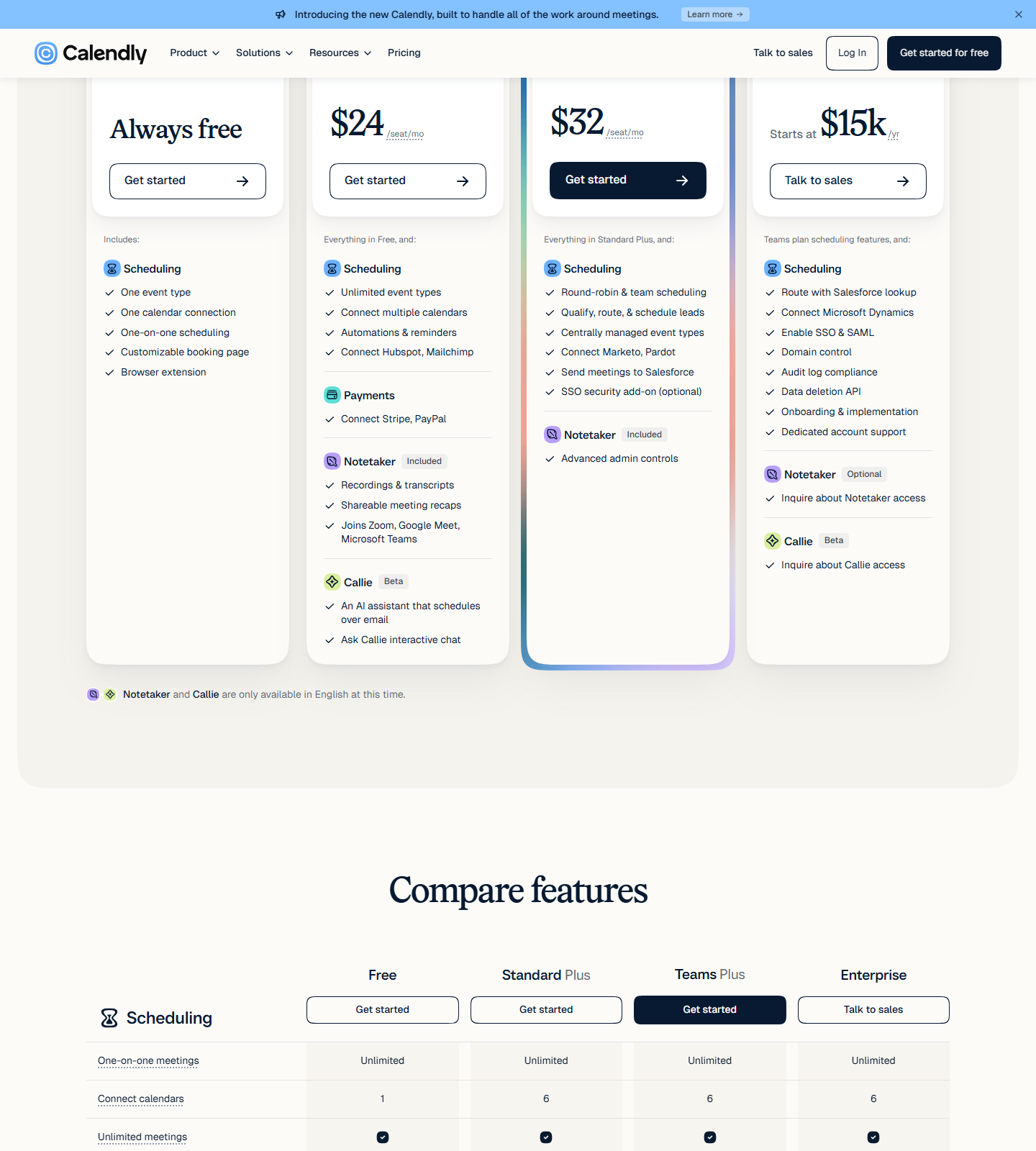
Calendly prints four prices on its pricing page and hides two more. Captured in a scripted browser session on 2026-10-11 (en-US, USD), with the billing control and the Notetaker upsell both exercised:
| Plan | Annual (per seat/mo) | Monthly (per seat/mo) | What the card prints |
|---|---|---|---|
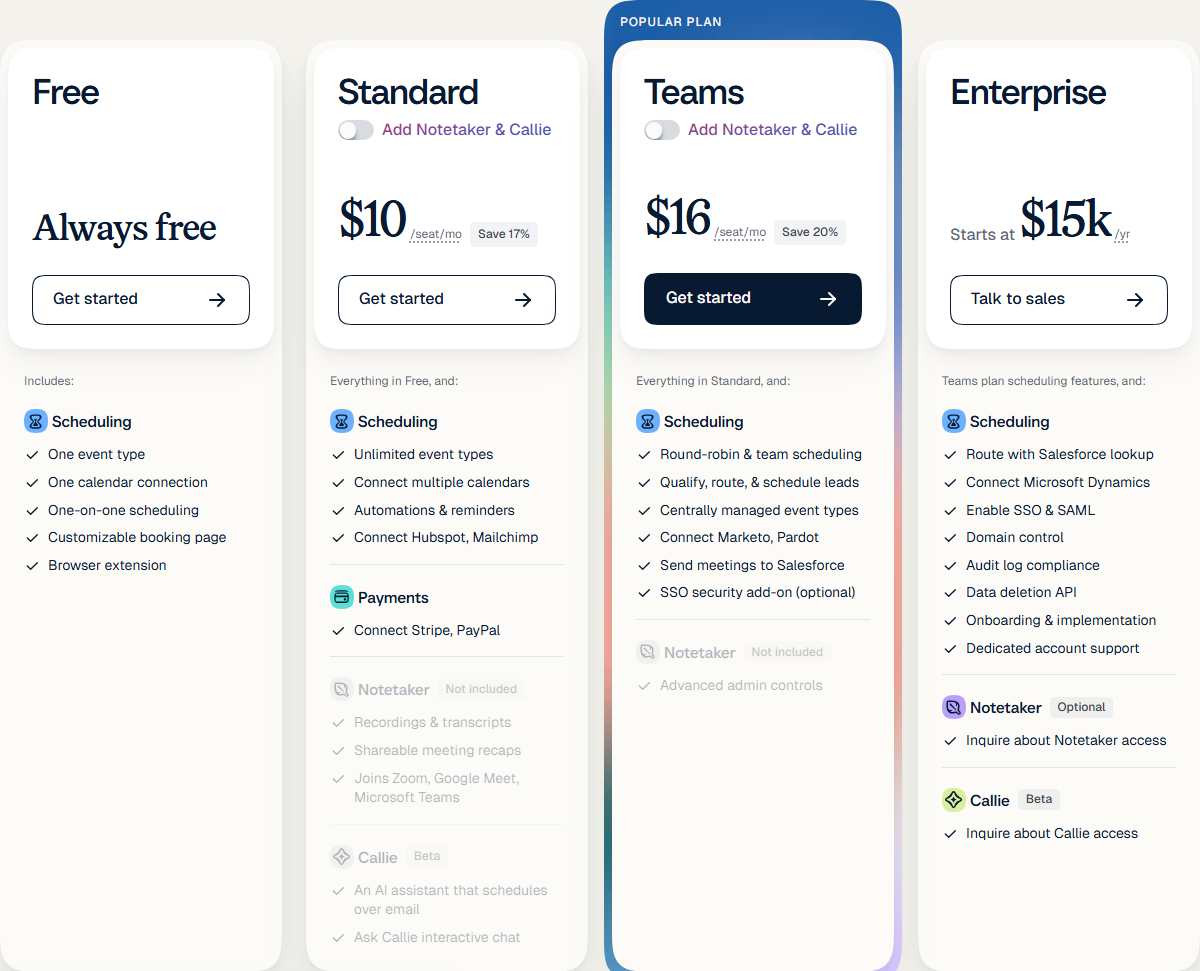
| Free | $0 | $0 | Always free, one event type, one calendar connection |
| Standard | $10 (Save 17%) | $12 | Unlimited event types, 6 calendars, workflows |
| Teams | $16 (Save 20%) | $20 | Round-robin, collective events, routing, Salesforce |
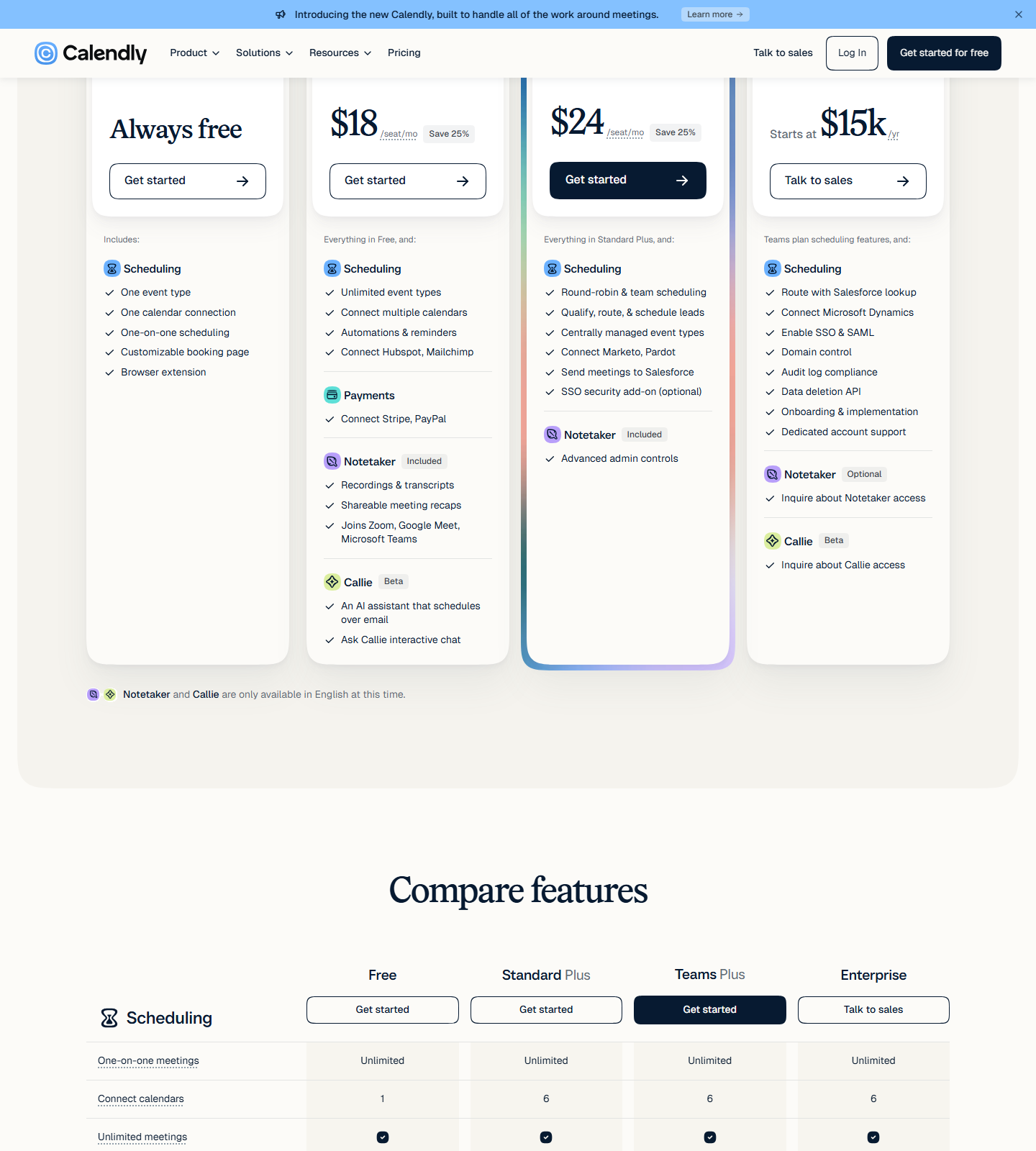
| Standard Plus | $18 (Save 25%) | $24 | Standard + Notetaker + Callie |
| Teams Plus | $24 (Save 25%) | $32 | Teams + Notetaker + Callie |
| Enterprise | Starts at $15,000/yr | not offered | 50-seat minimum, USD only, “Talk to sales” |
The two Plus rows are the finding: they are not on the page when it loads. They appear only after you click Add Notetaker & Callie on the Standard or Teams card — a prompt the page shows above the grid (“Add Notetaker and Callie to Standard or Teams plans”). Every Calendly pricing summary we read stops at Standard and Teams because it never clicks that button.
Both the Plus rows and the badge math above were cross-checked against an independent same-day text fetch of the same URL. No account was created or renewed in this pass — the hands-on side of the split is covered in the Calendly free-plan test linked at the top.
The discount badges, re-divided
Both badges are the page’s own numbers divided by us, not vendor claims:
- Standard: “Save 17%.” $12 → $10 is $2 off $12 = 16.7%, which rounds to 17%. Correct.
- Teams: “Save 20%.” $20 → $16 is $4 off $20 = 20.0%. Correct, exactly.
- Plus: “Save 25%” on both cards. Standard Plus $24 → $18 = 25.0%; Teams Plus $32 → $24 = 25.0%. Correct.
So Calendly’s badges are honest — they round the same way for all four plans, and the banner’s “Save up to 20%” (base) / “Save up to 25%” (Plus) matches the best row rather than overstating it. Per seat per year, that is $120 vs $144 on Standard and $192 vs $240 on Teams; a 10-seat Standard team pays $1,200 a year annually against $1,440 monthly, a $240 difference.
What the Notetaker bundle actually costs
The Plus bundle adds two named products — Notetaker (recaps, action items) and Callie (email scheduling coordination, meeting prep and recall) — and the page prices it as a plan, not as an add-on line item. Our measured delta between the base plan and the Plus plan on the same billing cycle:
- Annual: +$8 per seat/mo on both Standard ($10 → $18) and Teams ($16 → $24).
- Monthly: +$12 per seat/mo on both Standard ($12 → $24) and Teams ($20 → $32).
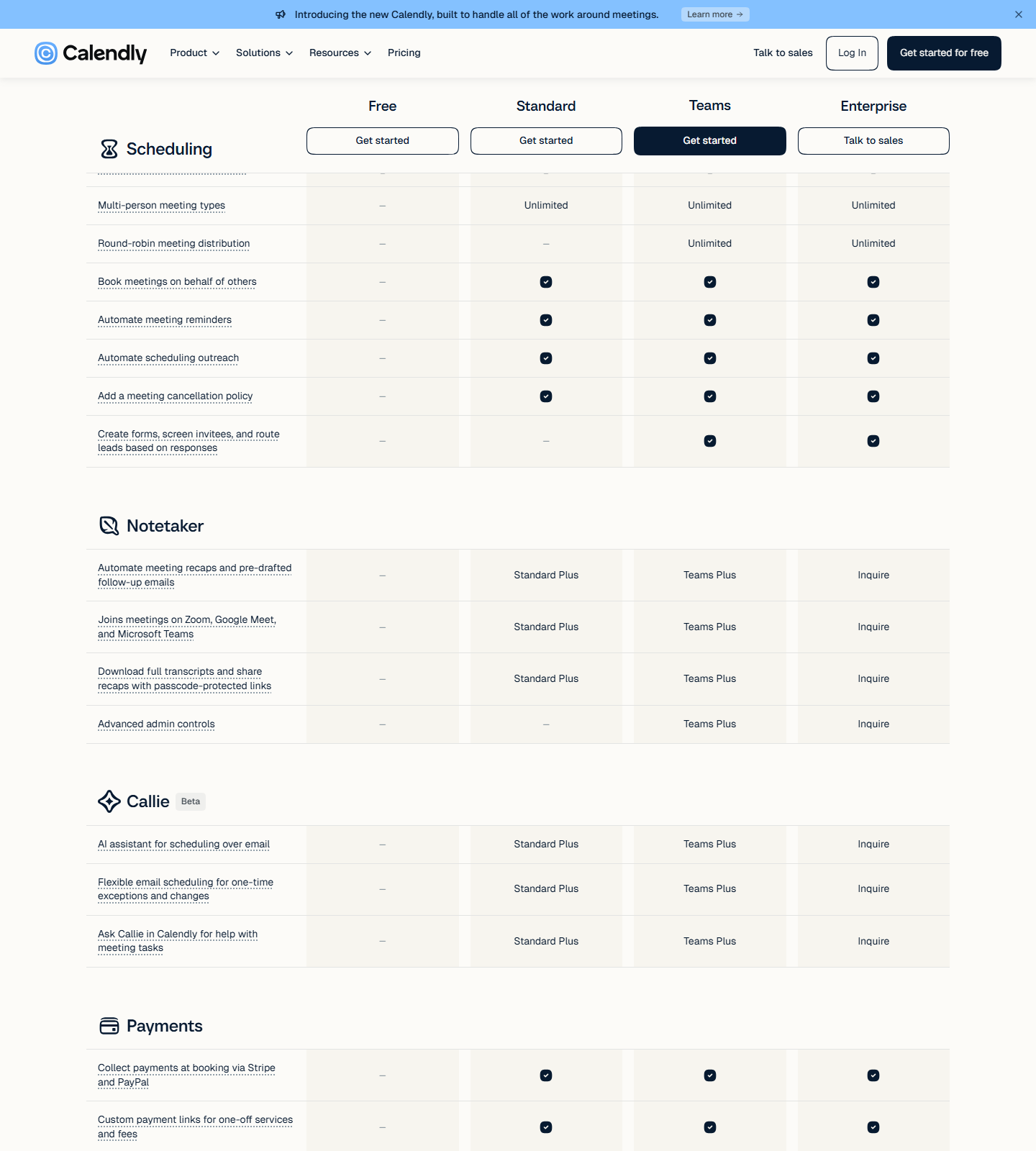
Because the upsell state has its own “Save 25%” badge, the bundle is cheaper per seat to buy annually than monthly in exactly the same proportion as the base plans — the bundle does not get its own pricing logic, it inherits the billing toggle. The compare-features block lower on the page confirms the two Plus columns sit next to the Notetaker and Callie rows, with Enterprise’s version marked “Inquire” (no number printed at that tier).
The Enterprise floor, divided
The Enterprise card prints two numbers: “Starts at $15k /yr” and “Starts at 50 seats”, plus “Available in USD only.” Dividing one by the other is ours:
- $15,000 ÷ 50 seats = $300 per seat per year = $25 per seat per month.
- That is 25% above Teams bought monthly ($20), 56% above Teams bought annually ($16), and 2.5× Standard’s annual rate ($10).
- At exactly 50 seats, 50 × $16 × 12 = $9,600/year on Teams — so crossing into Enterprise at the same headcount costs $5,400 more (56%) in year one.
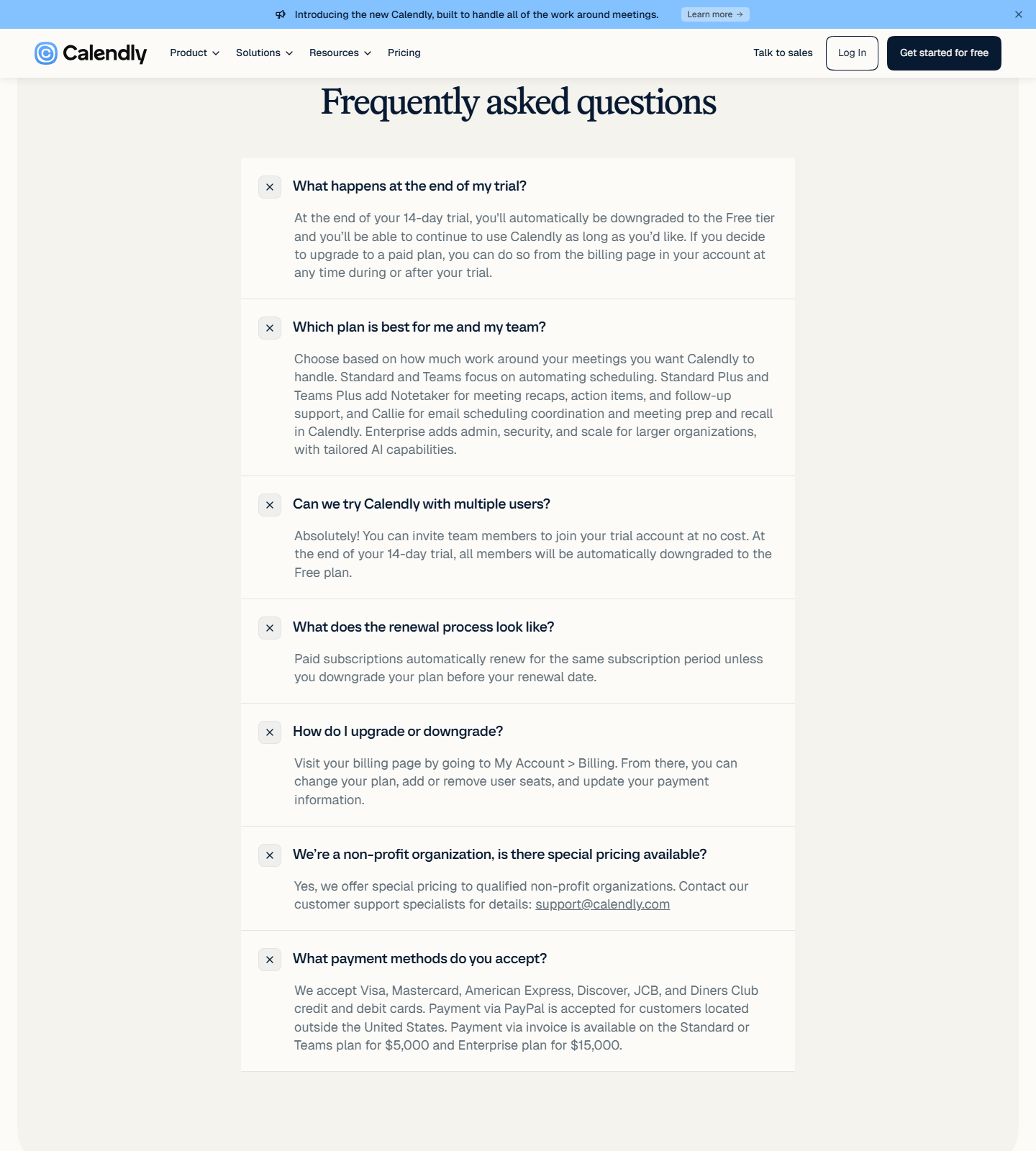
Enterprise is therefore a contract-and-features tier, not a volume discount, at its own stated minimum. The FAQ adds a second procurement number the cards never show: invoice payment is available on Standard or Teams plans at $5,000, and on Enterprise at $15,000 — meaning the $15,000 figure is both the Enterprise starting floor and the invoice-payment threshold for that tier.
Free plan: what $0 buys
The Free card prints “Always free” with one event type and one calendar connection; the feature matrix below repeats it as 1 connected calendar against 6 on every paid tier, and marks multi-person meeting types and round-robin as not included. The seat footnote under every card matters more than it looks: “Seats are required for users to connect calendars and host Calendly meetings — meeting invitees do not require a seat.” Attendees never cost you money; only the people hosting do.
Worth noting from our own free-plan test (documented with screenshots in the review): the “one event type” limit did not act as a hard wall in our account — two active event types coexisted without a warning. Treat the printed cap as the contract and the enforcement as uneven.
Billing mechanics, from the FAQ (expanded 2026-10-11)
- Trial: 14 days, then automatic downgrade to Free — “you’ll be able to continue to use Calendly as long as you’d like.” Teammates can join the trial at no cost.
- Renewal: paid subscriptions “automatically renew for the same subscription period unless you downgrade your plan before your renewal date.”
- Upgrades/downgrades run from My Account → Billing, where you can also add or remove seats.
- Payment methods: Visa, Mastercard, Amex, Discover, JCB, Diners Club; PayPal for customers outside the United States; invoice at $5,000 (Standard/Teams) or $15,000 (Enterprise).
- Non-profits get special pricing if qualified — the page names support@calendly.com rather than publishing a percentage.
Where our read stops
- No account was created or paid for in this pass. Whether an existing Standard subscription can add Notetaker mid-cycle, and how it prorates, is not verified — the billing-page FAQ only says seats and plans can be changed there.
- The Plus upsell’s persistence is unverified. We saw it appear on click; we did not test whether it survives a reload or a return visit from a logged-in session.
- Enterprise has no printed per-seat rate. The $25/seat/mo figure above is our division of the floor by the seat minimum, not a quote — sales may price larger deployments differently.
- Third-party figures (“4.7 on G2”, “100,000+ teams”) are Calendly’s marketing claims reproduced from the page, not our measurements.
- Prices move; everything above is verified 2026-10-11 and should be re-checked before buying.
Read next
- Hands-on free-plan test, booking to cancel: Calendly Review 2026
- The scheduling competitor at half the seat price, with both calendars tested: Cal.com vs Calendly
- The rival’s own price ladder: Cal.com Pricing 2026
Sources
- https://calendly.com/pricing — four captured states (annual base, monthly base, annual Plus, monthly Plus), the Enterprise card, the Notetaker/Callie compare rows and all seven expanded FAQ answers, scripted browser session on 2026-10-11 (en-US, USD)
- https://calendly.com/pricing — independent same-day text fetch of the same URL, used to cross-check $10 / $16 / $15k / Save 17% / Save 20% / “Standard Plus” / “Teams Plus”
- https://toolproofs.com/saas/calendly-review/ — our own free-plan hands-on test (2026-09, screenshots in the review), the source for the free-tier enforcement observation