Head to head, with receipts
We ran Cal.com hands-on on a real free account on 2026-08-31 (signup → booking link in 31 seconds → two visitor bookings → Cal Video links → cancel). On the Calendly side we did complete our own free-account hands-on run on 2026-09-03 (signup → booking link in under a minute → owner-side booking management and cancellation); that full test is now published as the Calendly free-plan review. Everything Calendly-related below stays limited to what this page itself evidences: pricing-page captures from 2026-08 and 2026-09-02 with the monthly/yearly toggle exercised. We say which claim rests on which kind of evidence on every page.
| Cal.com Free | Calendly Free | |
|---|---|---|
| Price | $0 forever | $0 forever |
| Event types | Unlimited | 1 |
| Calendar connections | Unlimited | 1 |
| Group/round-robin scheduling | Paid (Teams) | Paid (Teams) |
| Built-in video conferencing | Yes (Cal Video, verified in our run) | No — routes to Zoom/Meet/Teams links |
| Workflows / automations | Paid | Not on free |
| Mobile apps | Yes | Yes |
| Payments (Stripe/Paypal) on free | Yes (page-verified) | No — Standard and up ($10/seat+; our 09-02 capture lists payments features from Standard up) |
| Booking-page branding | None found in our DOM check | Not verified by us (no account) |
The pricing numbers nobody’s comparison page shows you
Calendly does publish both billing modes — this is the independent data point on this page. We toggled their live pricing page on 2026-09-02:
| Tier | Billed yearly | Billed monthly (toggle capture) |
|---|---|---|
| Standard | $10/seat/mo (Save 17%) | $12/seat/mo |
| Teams | $16/seat/mo (Save 20%) | $20/seat/mo |
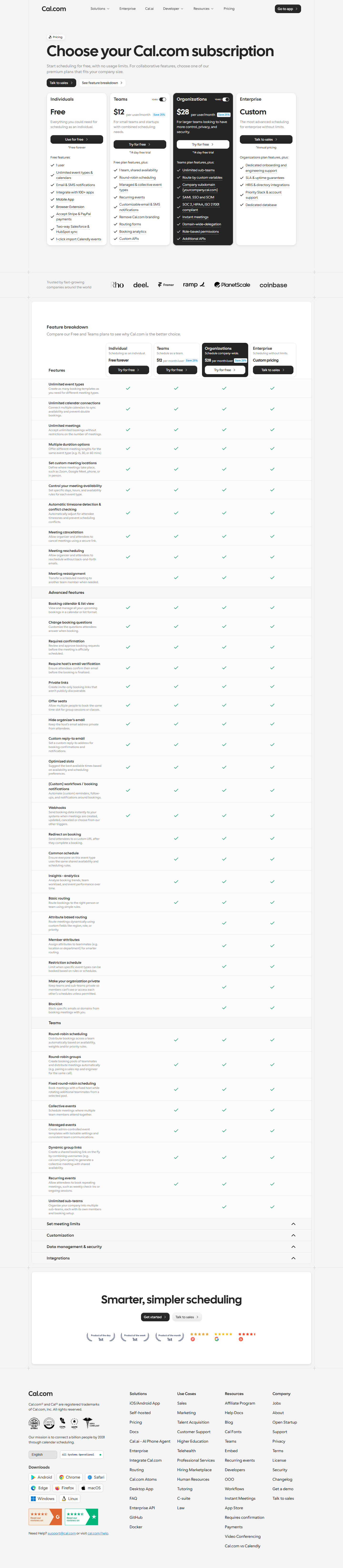
Cal.com shows only yearly rates — $12/user/mo Teams, $28/user/mo Organizations, “Save 25%”, with no monthly toggle existing on the page at all (checked programmatically on the same day). The two tools therefore look deceptively close at “$12”: that’s Cal.com’s locked-in yearly price and Calendly’s no-commitment monthly price at the same number.
Where each one actually wins
Cal.com wins when: you need more than one event type for free (Calendly gives you exactly one),
you want meetings to happen inside the tool (Cal Video needs no Zoom account — our second test
booking’s confirmation page carried a real app.cal.com/video/... link), you accept payments
through a booking link (Stripe/PayPal are on Cal.com’s free plan, and on Calendly’s Standard and
up), or you’re a team of 2+ and the per-seat math dominates.
Calendly wins when: you want the industry-default link your customers already know; you’re strictly solo + one meeting type (free is honestly enough); you’d rather have predictable monthly pricing with published numbers than Cal.com’s yearly-only display; or you don’t want to ever touch the config — which matters more than it sounds, because our test also hit Cal.com’s 1,440-minute default-duration trap (create an event, see zero availability, silently).
FAQ
Is Cal.com really free with no limits? For one user: unlimited event types, calendars, and bookings — “free, with no usage limits” is Cal.com’s own pricing-page wording, and our hands-on run hit no ceiling. Team features start at $12/user/mo (yearly).
Can you import Calendly into Cal.com? Yes — “1-click import Calendly events” is listed on Cal.com’s free-plan column (captured 2026-08-31 and 2026-09-02). We did not execute the import in our test (no Calendly account), so it’s page-verified, not hands-on.
Cal.com facts from our 2026-08-31 hands-on run; Calendly facts from calendly.com/pricing captured 2026-09-02 in both billing modes. See our testing methodology.