The short version
Framer and Webflow both advertise a roughly $10-15 entry price for a hosted site — and both pages hide where the bill actually diverges. This comparison is built from the two live pricing pages captured in September 2026 (Framer: 2026-09-10, re-verified 2026-09-13; Webflow: 2026-09-12 in both billing states). It is a terms comparison, not a hands-on test: we did not build a site on either platform.
Three structural differences that decide the real cost:
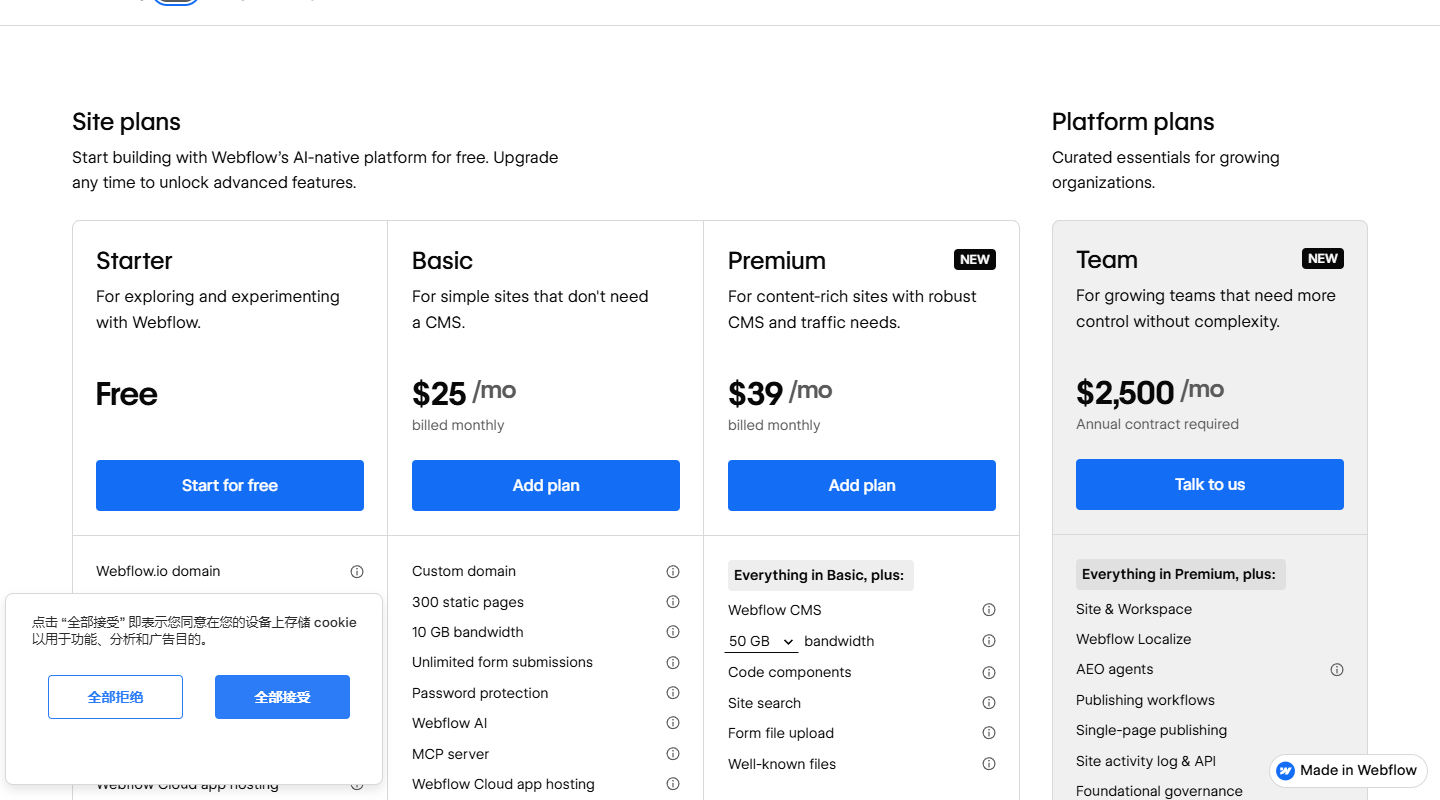
- Monthly billing works differently. Webflow raises its prices when you switch to monthly (Basic $15 → $25, Premium $25 → $39). Framer’s page states “All prices are monthly and billed according to the billing cycle selected at checkout” — the $10 and $30 headline numbers stay the same whether you pay monthly or yearly.
- A/B testing is a $50 line item on one page and a $299 line item on the other.
- Free plans mean different things. Framer’s free tier is for trying the product and non-commercial work on a subdomain; Webflow’s Starter is capped at 2 static pages and 50 form submissions but is explicitly a starting point for a real site you’ll upgrade.
Plan ladders side by side
| Framer (checked 2026-09-13) | Webflow (checked 2026-09-12) | |
|---|---|---|
| Free | $0 — framer.com subdomain, 1 GB bandwidth | Starter $0 — 2 static pages, 1 GB bandwidth, 50 form submissions |
| Entry paid | Basic $10/site/mo | Basic $15/site/mo yearly · $25 monthly |
| Mid | Pro $30/site/mo | Premium $25/site/mo yearly · $39 monthly |
| Team org | Enterprise custom | Team $2,500/mo, “Annual contract required” (Platform plan) |
| Top tier | Enterprise custom | Enterprise custom quote |
Prices are per site on both platforms, in USD, on the yearly state unless noted. Both pages add sales tax at checkout.
The billing-mechanics difference nobody puts in a headline
This is the point this page independently verified from the two pages’ own text, and it changes the comparison for anyone who wants month-to-month flexibility:
- Webflow prices in two states. The toggle on webflow.com/pricing switches every card: Basic reads $15/mo billed yearly and $25/mo billed monthly (+66.7%), Premium $25 vs $39 (+56%). We captured both states in Chrome with screenshots (evidence above).
- Framer prices in one. The page footer says verbatim: “All prices are monthly and billed according to the billing cycle selected at checkout. Any applicable sales tax will be added at checkout based on your location.” So Basic is $10/mo whether you commit to a year or not — the yearly sweetener on Framer’s page is a complimentary custom domain on yearly billing, not a lower number.
Practical read: the “Framer $10 vs Webflow $15” gap on yearly billing is small; on monthly billing the same comparison is $10 vs $25 and Framer wins on price flexibility outright.
A/B testing and add-ons: where the bills separate
Neither platform includes conversion experimentation in its site plans, but the starting prices are an order of magnitude apart:
- Framer Convert (A/B testing, funnels, triggers): $50/mo per 500,000 events, with up to 5 A/B tests on the add-on. Re-verified on the live page 2026-09-13.
- Webflow Optimize (A/B testing + personalization): $299/mo starting, metered by page views, with tiers from 25,000 to 500,000 views/mo printed on the card. Captured 2026-09-12.
Other add-on comparisons from the same captures:
| Add-on | Framer | Webflow |
|---|---|---|
| Localization | $20 per extra locale/mo (up to 20) | Localize Essential $9/mo (≤3 locales), Advanced $29/mo (≤10); free preview on any plan |
| Analytics | Included (30 days Basic / 90 days Pro history) | Analyze from $9/mo, metered by sessions |
| Ecommerce | No ecommerce plans on the page | Standard $29/mo (2% transaction fee), Plus $74/mo (0%), Advanced $212/mo |
| Advanced hosting | $200/mo add-on (multi-site, custom headers, max 6 rewrites) | Included hosting on Cloudflare CDN; bandwidth overage from +$20/mo per +50 GB (yearly) |
Two honest-math examples:
- A marketing site that runs A/B tests: Framer Pro + Convert = $30 + $50 = $80/mo; Webflow Premium + Optimize = $25 + $299 = $324/mo. The experiment budget, not the CMS, separates these stacks.
- A small online store: Webflow is $29 + a 2% transaction fee on Standard (Basic/Premium site plan on top); Framer simply does not sell ecommerce on this page — if you need a store, the comparison is moot.
Bandwidth headroom: comparable math, printed differently
From the same captures (Framer 2026-09-13, Webflow 2026-09-12/2026-09-13): Framer’s Pro plan includes 100 GB and its overage rate is $40 per extra 100 GB (to a 2 TB cap). Webflow’s entry plans carry less included bandwidth and its page prints an explicit add-on table — +50 GB at $20/mo billed annually ($30 monthly), +100 GB at $40/mo annually. Per-GB the top-up math is similar (about $0.40/GB); the difference is presentation: Webflow shows you the ramp, Framer shows you the cap (2 TB max, then Enterprise).
CMS models: both charge per site, but count differently
- Framer meters CMS per site: Basic = 2 collections / 1,000 items; Pro = 10 collections / 2,500 items; add-ons stretch Pro to 40 collections / 40,000 items (page text, 2026-09-13).
- Webflow does not print collection/item counts on site plans in the same units; Basic is explicitly the “no CMS” tier and Premium is the CMS tier — the ladder choice is binary, not metered.
Note on Framer’s free-plan FAQ: the page’s FAQ still says Free projects include “10 CMS collections, 1,000 pages” while the comparison table gives paid Basic 30 pages and 2 collections — an internal contradiction we re-confirmed on 2026-09-13 and could not reconcile from public sources (documented in our Framer pricing check). If the free tier is your decision-maker, verify limits inside the app.
Who is billed per seat
- Framer: workspace owner free, viewers free, additional editors $20/mo, content editors (CMS-only) $10/mo; Pro Experts get free editor access on client projects. Re-verified 2026-09-13.
- Webflow: the billable people sit in the workspace, not the site — Full and Limited seats are added per workspace plan, reviewers/commenters are free. Site plans can carry an unlimited number of paid sites on any workspace tier (page FAQ text, 2026-09-12).
A two-person build team on Framer Pro is $30 + 1 extra editor × $20 = $50/mo before add-ons — the same “sticker price vs real price” gap we flagged in the parent article.
Bottom line
- Choose Framer if you want the cheapest credible path to a fast, CMS-backed marketing site with experimentation: $10-30 per site, $50 A/B testing, and no monthly-billing penalty.
- Choose Webflow if the site is a content operation with editors producing in a real CMS workflow, or you need ecommerce plans Framer does not sell — and budget for the monthly uplift and the $299 Optimize floor if conversion testing matters to you.
- If both are “portfolio site, pay monthly,” the honest 2026 comparison is $10 vs $25 before seats.
Methodology & sources
- framer.com/pricing — captured 2026-09-10 (screenshots + full text), re-verified by full-text extraction 2026-09-13: Basic $10 / Pro $30, editor $20 / content editor $10, Convert $50 per 500k events, Advanced hosting $200, localization $20/locale, Pro add-on ceilings, billing footnote, free-plan FAQ paragraph. Zero drift between the two dates.
- webflow.com/pricing — captured 2026-09-12 in a real Chrome session in both billing states (toggle exercised; monthly state verified in-page), incl. Starter limits, ecommerce prices, Optimize/Analyze/Localize starting prices, Team $2,500 annual-contract card, bandwidth top-up table; bandwidth table text re-present in 2026-09-13 extraction.
- Parent articles with full per-page detail: Framer pricing check, Webflow pricing check.
- No account was created on either platform; no site was published. This page makes no hands-on claims. Checked September 2026 — pricing pages change; re-verify before citing.