The short version
This page is a terms check against Notion’s own pricing page, captured October 4, 2026. It is not a hands-on test — we did not sign up for a paid plan. Every number below was read off the official page in the screenshot panel above.
Notion sells on a per-member, per-month basis and has four tiers. The headline prices are simple: Free $0, Plus $10, Business $20, Enterprise on request. Annual billing saves up to 20%.
What makes the real number harder to predict is everything that sits outside the seat price: AI agent credits, custom domains for published sites, and the free plan’s 5 MB upload ceiling. If you’re pricing Notion for a team, those three lines matter more than the tier choice.
The four plans
| Free | Plus | Business | Enterprise | |
|---|---|---|---|---|
| Price (per member / month) | $0 | $10 | $20 | Custom — contact sales |
| Who it’s for | Individuals organising personal projects | Small teams and professionals | Growing businesses, multi-department | Orgs with compliance and security needs |
| Pages & blocks | Unlimited for individuals, limited at 2+ members | Unlimited | Unlimited | Unlimited |
| File upload cap | 5 MB per file | Unlimited (~5 GB per file) | Unlimited (~5 GB per file) | Unlimited (~5 GB per file) |
| Page history | 7 days | 30 days | 90 days | Unlimited |
| Guest limit | 10 | Unlimited | Unlimited | Unlimited |
| Notion AI | Limited trial | Limited trial | Full, incl. Notion Agent | Full + zero data retention |
| Search engine indexing | Basic | Advanced | Advanced | Advanced |
| Analytics | Basic | Basic | Advanced | Workspace-level |
| SAML SSO | — | — | ✅ | ✅ |
| Private teamspaces | — | — | ✅ | ✅ |
| User provisioning (SCIM) | — | — | — | ✅ |
Two lines in that table decide most upgrade decisions. On the free plan, blocks are unlimited only while you’re alone — the moment a second person joins the workspace, the limit applies. And AI is a trial, not a feature, on both Free and Plus; full AI requires Business at $20.
Exactly what the free plan’s block limit is (help-center detail)
The “limited at 2+ members” cell hides the sharpest rule in Notion’s pricing. From Notion’s official help article Understanding block usage (read 2026-09-09, the same date as the plan capture; the plan table was re-scanned on 2026-09-28 and 2026-10-04 with no price drift):
| Plan | Workspace size | Block usage |
|---|---|---|
| Free | 1 workspace owner | Unlimited |
| Free | 2+ workspace owners | 1,000 blocks per workspace, then upgrade required |
| Plus / Business / Enterprise | Any | Unlimited |
- It is a lifetime counter. “We count blocks based on the amount of content created in your workspace since signing up — deleting blocks, or emptying the trash, will not reduce your block count.” You cannot recycle your way out of the cap.
- Everyone you invite on Free becomes an owner. The article’s footnote: “People added to workspaces on a Free Plan can only join as workspace owners.” Inviting one colleague is exactly the action that moves an unlimited solo workspace onto the 1,000-block meter — there is no “add a member without triggering it” path.
- Hitting 1,000 blocks triggers a three-day grace period; existing content stays editable after the cap, and usage is visible under Settings → Upgrade plan.
- The rest of the free tier is generous: unlimited databases, Notion Calendar, basic forms and
sites, the public API, web publishing, one
notion.sitedomain — plus 5 MB per file, 7-day page history, 10 external guests, 1 chart and basic (button-only) automations.
What “per member” actually costs
Notion bills on members, not guests. Guests you invite to read or comment specific pages don’t consume a seat on any plan — so external collaborators are free even on Plus and Business.
That matters if your workspace looks like this: 8 people who edit daily, 40 clients who only need to read a shared page. You pay for 8 seats ($80/mo on Plus), not 48.
Mid-cycle seat changes are prorated. Upgrades take effect immediately and are charged for the remainder of the cycle; downgrades apply at the end of the current cycle.
The costs that aren’t in the tier price
This is where the headline $10 can understate a real budget.
Custom domains — $8/mo or $10/mo, per domain
Publishing a Notion site on your own domain is an add-on charged on top of whichever plan you’re
on. It’s $8/month per domain on annual billing, $10/month per domain on monthly billing, and the
page states this charge is separate from the seat price. The free plan can’t connect a custom
domain at all — you’ll be on a notion.site subdomain.
Custom Agents — $10 per 1,000 Notion credits
AI agents that run tasks autonomously are billed by usage, not by seat. Notion describes them as “free to try, then $10 per 1,000 monthly Notion credits.” In the feature comparison table, the Custom Agents row reads “Requires Notion credits” on the Business and Enterprise columns — meaning the capability itself is gated to those tiers, and the credits are consumed on top of your seat price rather than included in it. Nobody quotes this in a Notion pricing summary, but if you plan to lean on agents rather than just Notion AI, this line scales with usage and can overtake the seat price.
Note that Notion is not fully consistent about this feature across its own pages: the
/product/ai page lists Custom Agents inside the Business bullet list, while the /pricing
comparison table attributes it to Business and Enterprise separately with the credits requirement.
The seat price is $20 either way, but the exact entitlement wording differs depending on which
official page you read.
The free plan’s 5 MB upload cap
on Free you’re limited to 5 MB per file. The upgrade is to “unlimited with a ~5 GB max per file.” If your workspace involves design mockups, video, or large PDFs, the free plan hits that ceiling fast — this is usually the real reason people upgrade, not the block limit.
Student and educator pricing
If you sign up with a school email address, Notion gives you the Plus Plan free — capped at one member. Against the Free Plan that adds more guests, longer version history, and larger file uploads. This is a straight quote from the pricing page FAQ, not an inference.
If you are weighing this against cheaper seats, see Notion vs ClickUp, Notion vs monday.com and Notion vs Basecamp — Basecamp in particular charges a flat $25 with no per-user fees. If AI is the deciding factor, our Notion AI pricing page covers the Business-tier threshold and agent credits, and if you are shopping for a note-taking tool rather than a seat, Notion vs Obsidian shows why the two differ sharply on price model, with Obsidian’s Sync and Publish also charged separately.
Refunds and downgrades
Downgrading within 3 days of signing up on a monthly subscription, or within 30 days on an annual subscription, gets you a full (not prorated) refund. EU and UK residents may have longer statutory windows — the page notes customers in mandatory-refund regions can sometimes claim monthly refunds past 72 hours.
A failed payment gets retried up to 8 times over the following month. If it still fails, the workspace drops to restricted access before being downgraded to Free.
Monthly vs yearly billing
Notion’s pricing page carries a “Pay monthly / Pay yearly” toggle and advertises “Save up to 20% with yearly.” We captured both states on October 4, 2026 — the second screenshot above is the monthly view.
| Free | Plus | Business | |
|---|---|---|---|
| Pay monthly | $0 | $12 per member/mo | $24 per seat/mo |
| Pay yearly | $0 | $10 per member/mo | $20 per seat/mo |
So the yearly discount is real and consistent: Plus drops from $12 to $10 (a 17% saving) and Business from $24 to $20 (also 17%). The page’s “up to 20%” is slightly generous phrasing for the actual $12→$10 and $24→$20 deltas — useful to know if you’re budgeting tightly.
Enterprise stays quote-only in both modes.
Custom domains split the same way: $10/month on monthly billing, $8/month on annual billing, per domain. Custom Agent credits are billed per 1,000 credits either way and aren’t affected by the billing mode.
Who should pay for which tier
- Solo, personal notes — Free is genuinely unbounded while you’re the only member. Nothing to buy.
- Two or three people collaborating — Plus at $10 removes the block limit and the 5 MB cap. This is the value tier.
- A team that wants AI — Business at $20 is the first tier with real AI, not a trial. If AI isn’t the reason you’re on Notion, Plus is the rational stopping point.
- Publishing on your own domain — budget the $8–$10/domain/month on top of whatever tier you’re on.
- Regulated or security-driven orgs — Enterprise is quote-only; SAML SSO and private teamspaces start at Business, but SCIM provisioning and audit logs don’t.
Security posture as Notion publishes it (checked 2026-09-29)
From notion.com/security — platform-level claims, not a guarantee about any individual workspace’s configuration:
- Encryption, least-privilege access control, secure software development, and a public bug bounty run through HackerOne.
- SOC 2 Type 2 attested by independent third-party auditors; compliance reports available through Notion’s Trust Center (trust.notion.com) on request.
- Workspace controls — SAML 2.0 SSO, SCIM directory sync, audit logs — sit behind the Business/Enterprise tiers, not the free plan. On the free plan the variable you control is share-link hygiene, since SSO and audit logs aren’t available to you.
- Privacy program mapped to GDPR and CCPA; subprocessors handling AI features are prohibited from using customer data to train models.
- Reliability claim from the same page: 99.9% uptime SLA, hosted on AWS behind Cloudflare.
What our probes could not get past (why this is terms-level, not hands-on)
- Disposable-email signup is rejected. On 2026-09-17 a throwaway-domain address stopped at the email step with the inline error “Invalid email domain”, before any password or CAPTCHA prompt; a mainstream-domain address passed the same check. Hands-on coverage therefore requires a real mailbox — this is why our own eval line could not proceed past the door.
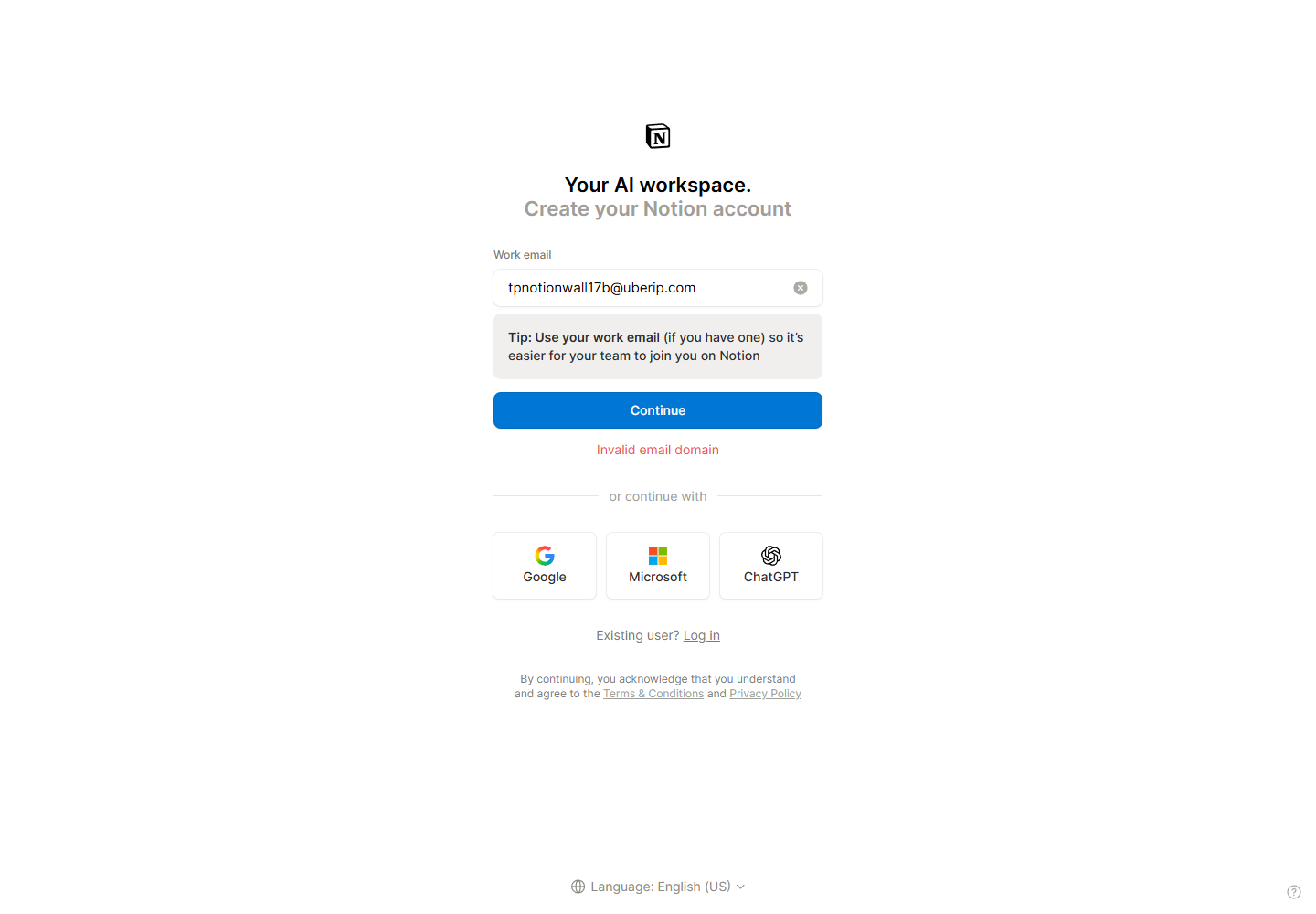
app.notion.comrejects default headless Chromium as an “unsupported browser”; the real signup page is only reachable with a genuine Chrome channel, and runs behind an invisible hCaptcha. Nothing about ordinary users, but it documents why automated signup attempts fail.- Not verified: the actual annual checkout total (the page prints $10/member/month even in the yearly state, so $120/member/year is arithmetic, not a published figure); student/education discounts (third parties claim free Plus with a school email, but Notion’s FAQ answer did not render for us and we won’t state it as fact); the ChatGPT SSO button’s login flow.
- The refund clause has its own page: Notion Refund Policy 2026 covers the 3-day/30-day windows and a wording discrepancy between Notion’s pricing FAQ and its help center.
Verdict
Notion’s headline pricing is among the least confusing in this category — $0 / $10 / $20 / quote with guests free on every paid tier. Where it gets murky is everything outside the seat price: custom domains billed per domain, and agent credits billed per 1,000 with no seat ceiling in sight. If you’re evaluating it against the note-taking category more broadly, our Notion alternatives page covers the feature side.
Pricing verified against notion.com/pricing on October 4, 2026. Notion changes its tiers often — check the official page before making a purchase decision.

